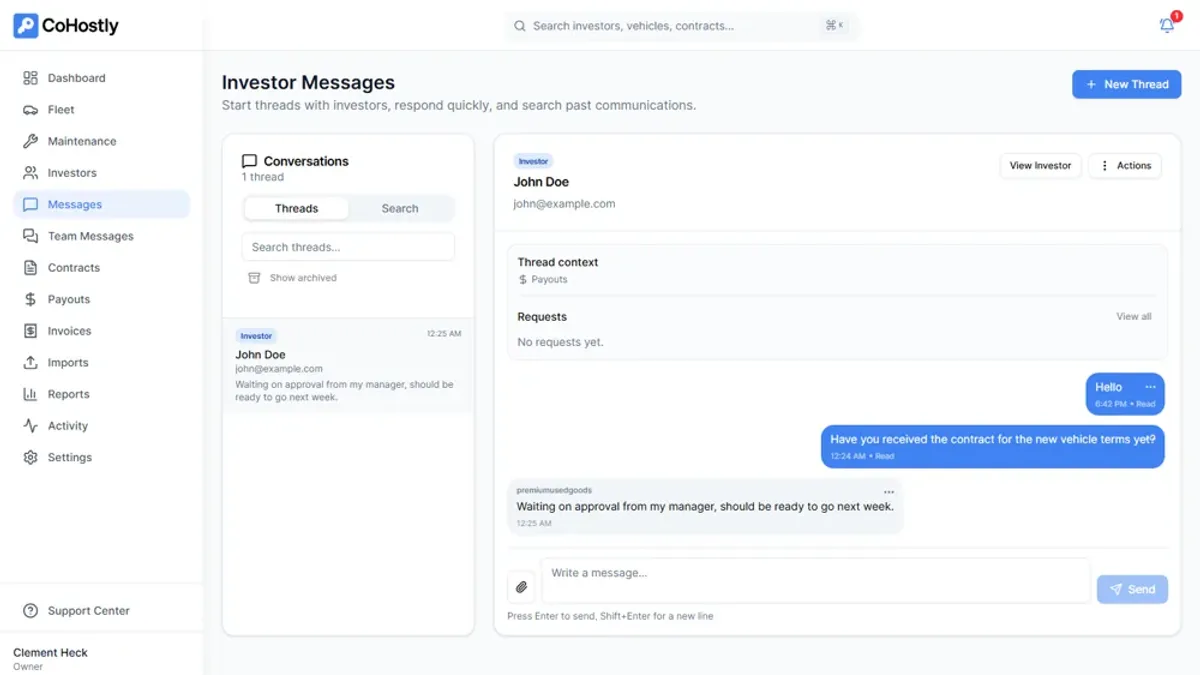
The fence company owner answers the same question every afternoon: "When are you starting my install?" The answer hasn't changed since last week, but the text comes anyway, usually while he's on a ladder. Multiply that by twenty active jobs and you have a business where the bottleneck isn't crews or materials, it's the owner's phone. The work that actually grows a service business keeps losing to the work of telling people what's already happening.
A client portal pulls all of that out of texts, voicemails, and buried email threads and puts it in one place a customer can check themselves at any hour. We build these into the sites we ship for contractors, HVAC companies, and clinics, and the pattern is consistent: the owner stops being the human status page, the client stops feeling left in the dark, and the business can take on more work without hiring someone just to answer questions. Below is how to tell when you've hit that wall, what the portal actually needs to do, and how to get one running without rebuilding your whole operation overnight.
What Is a Client Portal?
A client portal is a secure, branded online space where your clients can log in to view their project status, review and approve deliverables, send messages, access files, and manage their account—all without sending you an email or making a phone call.
Think of it as giving each client a VIP backstage pass to their project. Instead of wondering "what's the status?" or digging through emails for that document you sent last week, everything is organized in one accessible place.
Without a Client Portal
- Status updates via email chains (lost in inboxes)
- Files shared through Google Drive links (disorganized)
- Approvals handled via email replies (unclear)
- Clients calling for updates (time-consuming)
- Invoices sent separately (disconnected)
- Onboarding through scattered forms and calls
With a Client Portal
- Real-time project dashboard (always current)
- Organized file library with version history
- One-click approval workflows (clear records)
- Self-service status checks (24/7 access)
- Integrated billing and payment tracking
- Guided onboarding with step-by-step checklists
7 Signs You Need a Client Portal
Not every business needs a client portal right away. But if you're experiencing any of these symptoms, a portal isn't a luxury—it's a necessity for sustainable growth.
1. You Spend More Time on Emails Than on Actual Work
If your inbox is full of "What's the status?" and "Can you resend that file?" messages, a portal eliminates these repetitive exchanges entirely. Clients check their dashboard instead of emailing you.
2. Files Are Scattered Across Multiple Platforms
Contracts in DocuSign, designs in Google Drive, invoices in QuickBooks, notes in email. A portal consolidates everything into one organized, client-accessible location.
3. Your Approval Process Is a Bottleneck
If getting client approval on deliverables involves multiple email rounds and unclear feedback, a portal with built-in approval workflows lets clients review, comment, and approve directly—with a clear audit trail.
4. Onboarding New Clients Takes Too Long
If onboarding involves 5 separate emails, 3 phone calls, and a scavenger hunt for information, a guided portal onboarding flow streamlines the entire process into a single, self-guided experience.
5. You Can't Take on More Clients Without Hiring
If communication overhead is your bottleneck, a portal removes that bottleneck. Many businesses find they can handle 30–50% more clients with the same team after implementing a portal.
6. Clients Keep Asking the Same Questions
When multiple clients ask about timelines, processes, or next steps, it means your communication system is failing. A portal with progress tracking and resource libraries answers these questions proactively.
7. You're Losing Clients to More Organized Competitors
If competitors offer polished client experiences while you're still sending Word docs via email, you're losing on perceived professionalism. A portal instantly elevates your brand.
Essential Features for Service Businesses
Not all client portals are created equal. The right features depend on your business type, but these are the essential capabilities that deliver the most value for service businesses.
Core Portal Features
- Project dashboard: A visual overview showing project status, milestones completed, upcoming deadlines, and next steps. Clients should understand their project status at a glance
- File & deliverables library: Organized file storage where clients can access all project documents, designs, reports, and deliverables with version history
- Approval workflows: Let clients review and approve deliverables directly in the portal with comments, revision requests, and sign-off tracking
- Messaging system: In-portal messaging keeps all project communication in one place instead of scattered across email threads
- Secure login: Password-protected access with optional two-factor authentication to protect sensitive business and project information
- Mobile access: Responsive design so clients can check their project status and approve deliverables from their phone
Advanced Features for Growing Businesses
- Client onboarding: Guided questionnaires, discovery forms, and welcome sequences that collect everything you need from new clients automatically
- Analytics dashboard: If applicable, show clients real-time performance data (website traffic, ad performance, project metrics)
- Training & knowledge base: Documentation, video tutorials, and how-to guides that empower clients to self-serve for common questions
- Billing integration: View invoices, payment history, and upcoming charges within the same portal experience
- Change request system: Formal process for clients to submit change requests with scope and timeline implications clearly communicated
- Multi-project support: For clients with multiple ongoing projects, dashboards that organize each project separately
How a Portal Transforms Your Operations
The benefits of a client portal extend far beyond convenience. When implemented well, a portal fundamentally changes how your business operates—reducing costs, increasing capacity, and improving client relationships simultaneously.
Operational Benefits
- Save 15–20 hours/month: Eliminate repetitive email communication, status update calls, and file-hunting. That's 1–2 full days of recovered productive time per month
- Handle more clients: With communication overhead reduced by 40–60%, your team can manage significantly more projects without adding headcount
- Faster project turnaround: Approval bottlenecks are the #1 cause of project delays. In-portal approval workflows can cut approval times from days to hours
- Reduce scope creep: A formal change request system with clear documentation prevents the "while you're at it" requests that inflate project scope
- Improve cash flow: Integrated billing with clear payment milestones tied to project progress reduces late payments and disputed invoices
Client Experience Benefits
- 24/7 self-service access: Clients can check their project status at midnight without waiting for your office to open. 70% of customers prefer self-service over contacting support
- Transparency builds trust: When clients can see exactly what's happening with their project, anxiety decreases and trust increases
- Professional impression: A branded portal makes you look larger and more established. It's a competitive differentiator that many competitors don't offer
- Better retention: Clients who are embedded in your portal are 40% more likely to hire you for future projects—switching costs are higher and the experience is familiar
- Referral driver: Clients who love your portal experience talk about it. "My contractor has this amazing online portal where I can see everything" is powerful word-of-mouth
The Compound Effect
The real power of a client portal isn't any single benefit—it's the compound effect. Less time on admin means more time on quality work. Higher quality work means better reviews. Better reviews mean more clients. More clients managed efficiently means more revenue without proportional cost increases. It's a growth flywheel.
Build vs Buy: Choosing Your Portal Solution
When it comes to implementing a client portal, you have three main options. Each has trade-offs depending on your budget, timeline, and how unique your needs are.
SaaS Portal Tools
Pre-built platforms like Monday.com, Dubsado, or HoneyBook that offer client-facing features.
- Cost: $20–$200/month
- Timeline: Days to set up
- Branding: Limited customization
- Best for: Businesses with standard workflows
WordPress Plugins
Portal plugins for WordPress sites like Client Portal, WP Client, or custom combinations.
- Cost: $100–$500 one-time + hosting
- Timeline: 1–2 weeks
- Branding: Moderate customization
- Best for: Businesses already on WordPress
Custom-Built Portal
A portal designed and developed specifically for your business processes and brand.
- Cost: $10,000–$50,000+
- Timeline: 1–3 months
- Branding: Fully custom
- Best for: Businesses with unique workflows
For a deeper comparison of custom-built vs off-the-shelf solutions, check out our guide on Custom Software vs Off-the-Shelf Tools.
What We Built at Heck of a Website
We built our own custom client portal from scratch because no off-the-shelf tool matched our workflow. Our portal includes project dashboards, approval workflows, a content hub, deliverables library, messaging, analytics, and guided onboarding—all branded to our experience. It's become one of our biggest competitive differentiators and something clients consistently rave about. See our client portal.
Getting Started with Your Client Portal
Implementing a client portal doesn't have to happen all at once. Start with the features that solve your biggest pain points and expand from there.
Your Portal Implementation Roadmap
Phase 1 — Identify pain points: What's eating your time? Status update emails? File sharing? Approvals? Start with the one thing that would save you the most hours per week.
Phase 2 — Choose your approach: Based on your budget and needs, decide between SaaS, WordPress plugin, or custom-built. For most growing businesses, starting with SaaS and upgrading to custom later is the pragmatic path.
Phase 3 — Set up and test: Configure your portal, create templates, and test with one or two friendly clients who'll give honest feedback.
Phase 4 — Roll out to new clients: Start all new clients on the portal immediately. Create a simple onboarding guide or video walkthrough.
Phase 5 — Migrate existing clients: Gradually move existing clients to the portal, starting with those who are most tech-comfortable or who generate the most communication overhead.
Phase 6 — Iterate and expand: Based on client feedback and your own experience, add features, refine workflows, and optimize the experience over time.
Need a Custom Client Portal?
If your business needs a portal that matches your exact workflow and brand, we can build it. At Heck of a Website, we design and develop custom client portals with project management, approvals, messaging, and analytics. Schedule a free consultation to discuss your portal needs.